

Settings that LaserCat is still testing on live trading carry a Test badge. Its tooltip says: “We’re still testing this setting on live trading. It works; if anything looks off, tell the LaserCat team.”
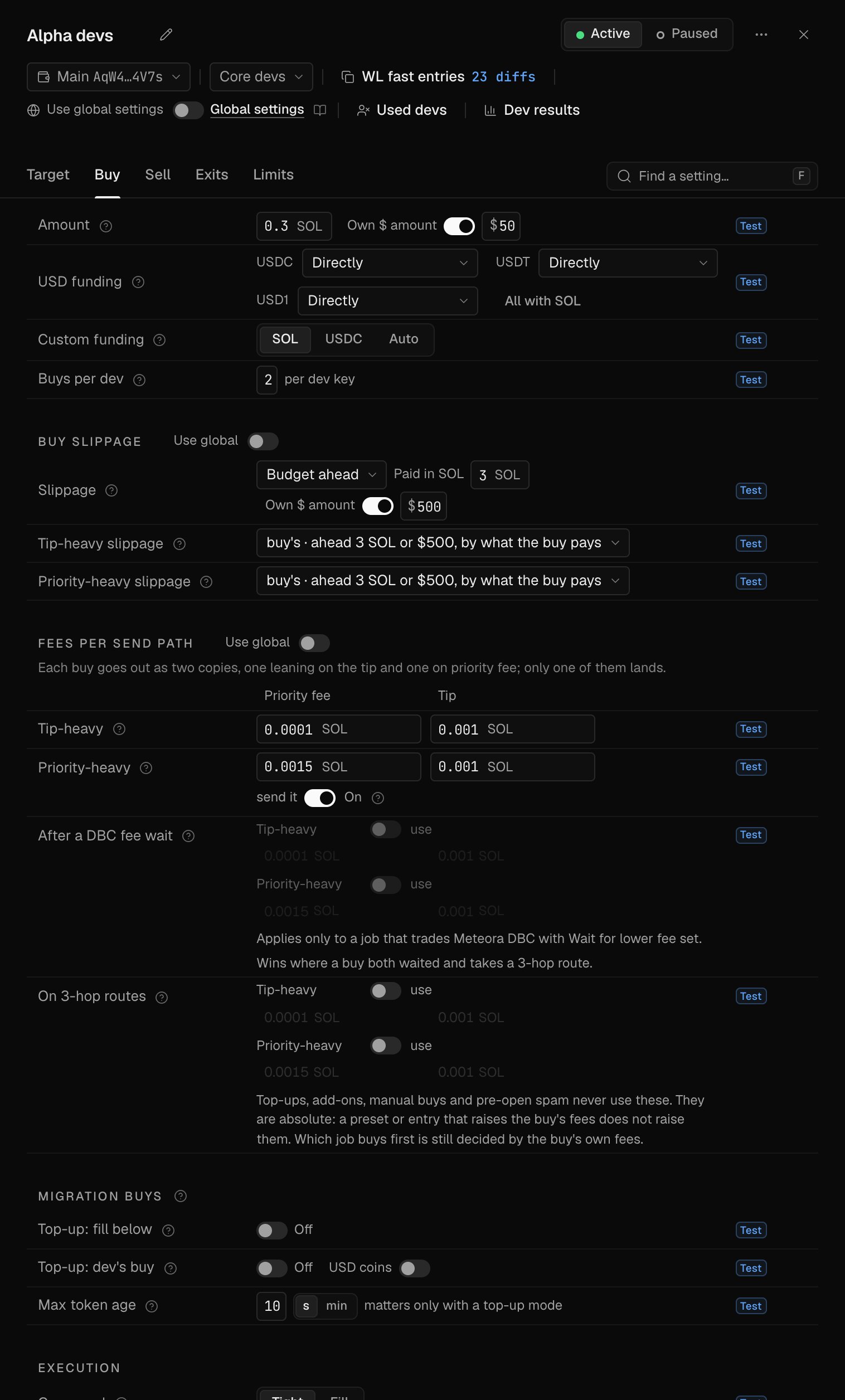
Buy
Buying
Shows only on a job saved with buying off. The row reads Off: decides, never buys and offers Turn buying on. Such a job still decides, but never buys, whatever its state. To stop buying, pause the job instead.Amount
SOL coins use the SOL amount; USDC, USDT and USD1 coins bought Directly use the dollar amount (see USD funding).- Amount, SOL: what each buy of a SOL coin spends, and of a stablecoin’s coin bought Through SOL.
- Own $ amount: a switch and Amount, USD coins. On: a fixed dollar amount for USDC, USDT and USD1 coins. Off: the SOL amount at the shared SOL price, in whole cents; the row reads, for example, “from SOL: about $15.00”, and its tooltip gives the price per SOL and its age. A typed amount is used as typed.
- Without a current SOL price (none published yet, or the last older than about 30 minutes), the row reads no current SOL price: not bought: a buy that needs a dollar amount from SOL is skipped until a new price is published.
- An amount under a cent reads under a cent: not bought.
- To buy no USD coins, block USDC, USDT and USD1 in Quotes (Target tab).
USD funding
Snipe and copy jobs. How each stablecoin’s coins are bought, with one picker per coin: USDC coins, USDT coins, USD1 coins.- Directly: with the dollar amount, from the wallet’s own USDC, USDT or USD1.
- Through SOL: with the SOL amount, through the router. No stablecoin is needed; it is a SOL position, sold back to SOL.
Custom funding
Snipe and copy jobs. What a coin of a custom quote (any quote but SOL, USDC, USDT and USD1: xStocks, PUMP, ORE) is bought with, through the router. Choose in Custom quotes bought with:
With USDC or Auto, a dollar amount switch shows beside the choice: the same dollar amount as the Amount row’s. Off, it reads none: not bought (USDC) or none: SOL alone (Auto). A note beside it says what the choice needs: “the wallet’s USDC: a dollar position”, or “both amounts, SOL and USDC on the wallet, limits in SOL and $”.
Set the real dollar amount first: with USDC or Auto, a new job’s $0.02 buys $0.02 of USDC. The panel does not save until you change it.
Keep USDC on the wallet: a buy that lands and fails without it is lost.
Buys per dev
Snipe jobs. How many times one dev is bought before the job stops buying them, from 0 to 16, 1 by default. 0 reads no cap; any other number counts per dev key. Structural: a change applies in about 60 s.Slippage
Choose its form (by default, Percentage at 10%):-
Budget ahead: how much others may buy before us. A buy is held to the amount in the currency it pays, never both:
- Paid in SOL (Budget ahead, SOL): for buys paid in SOL: a SOL coin, a USD coin bought Through SOL, a custom quote’s coin bought with SOL.
- Own $ amount (Budget ahead, paid in $): a fixed dollar budget for buys paid in dollars: a USD coin bought Directly, a custom quote’s coin bought with USDC. Off: the SOL budget at the shared SOL price, in whole cents, read as “from SOL: about $…”.
- Percentage: how far the price may move. Set Slippage, percent.
Min tokens
Snipe LP jobs that name coins. The least tokens a buy accepts, in the coin’s whole tokens, beside the slippage: the larger of the two minimums wins. It is required, at least 1: the pool’s opener sets the price.Open wait
Snipe LP jobs. A pool that opens later is bought at its opening if that is within this time “after the deposit”: from 0 to 60 min, 10 min by default. 0: only pools that trade at once.Fees per send path
Each buy goes out as two copies, and at most one of them lands. Each line sets one copy’s Priority fee and Tip.Tip-heavy
This copy pays mostly a tip: Tip-heavy priority fee and Tip-heavy tip.Tip-heavy slippage
A line under Tip-heavy, marked “custom slippage”: this copy’s own slippage, a percentage or a budget ahead, as the buy’s.- Buy’s slippage, shown with its value (for example “buy’s · 15%”): the copy takes the buy’s slippage.
- Budget ahead or Percentage: the copy’s own.
Priority-heavy
The second copy pays mostly a priority fee, plus its own tip: Priority-heavy priority fee.Priority-heavy tip
Beside the priority-heavy priority fee: this copy’s own tip. Empty: the minimum tip.Priority-heavy copy
A switch under the priority-heavy fees.- On: every buy goes out as both copies.
- Off (“the tip-heavy copy alone: its fees must land the buy”): every buy goes out as its tip-heavy copy alone, an entry and a migration top-up alike. The wallet’s spend limits and SOL reserve and the top-up floor then count the tip-heavy copy alone, so its fees must land the buy by themselves.
Priority-heavy slippage
The second copy’s own slippage, as in Tip-heavy slippage. While the copy is off, its slippage is kept with its fees and applies again once it is on.After a DBC fee wait
Snipe jobs. The fees a buy of a Meteora DBC coin pays after it waited for its fee to fall under Max fee (Wait for lower fee, Target tab). The row is greyed until the job trades Meteora DBC with that wait set: “Applies only to a job that trades Meteora DBC with Wait for lower fee set.” Each copy has a line of its own, Tip-heavy and Priority-heavy, with a use switch:- Off: the copy pays the buy’s own fees, shown greyed in its fields. On a buy whose route also has three hops, it takes the On 3-hop routes copy where that one is set.
- On: set the copy’s Priority fee and Tip; it starts from the buy’s own fees of that copy. The priority-heavy tip left empty is the minimum tip.
On 3-hop routes
Snipe and copy jobs. The fees a buy pays when its route has three hops, set the same way: a use switch per copy, its Priority fee and Tip; a copy left off pays the buy’s own fees. What both rows share:- Migration top-ups and a copy job’s add-ons never use them.
- “They are absolute: a preset or entry that raises the buy’s fees does not raise them.” Which job buys first is still decided by the buy’s own fees.
- A trade preset or a list entry may set them for its devs.
- While the priority-heavy copy is off, its part is greyed: “The buy’s priority-heavy copy is off: these fees are kept for when it is on.”
- They belong to the Buy fees group of Global settings.
Migration buys
Snipe jobs. After a targeted dev’s coin (or a named mint) migrates, buy the rest of the planned amount on its pool. Never for any-dev matches. With Migration sell on (Exits tab), the panel warns: “Migration sell wins: this job never tops up.”Top-up: fill below
Mode A (Top-up mode A): after the coin migrates, buy the rest of the amount on the pool when our curve buy filled less than this share of it (“our curve buy filled below”). It has its own switch.Top-up: dev’s buy
Mode B: top up when the dev’s own launch buy was at least this much (“dev bought ≥”). It has a switch and an amount for SOL coins, and another pair for USD coins in $.Max token age
The oldest a token may be for a migration buy: the top-up and a graduation buy. From 1 s to 6 h, 10 s by default. With a top-up mode on, the row reads “at the migration”; without one, “matters only with a top-up mode”. A Meteora DBC coin’s pool opens at its migration and is bought there, its age measured to the pool’s opening plus one second.Execution
Curve end
How a buy on a Pump curve meets the curve’s end.- Tight (the default): the compute of the best case, so a buy that others’ buys push to the end fails there. That failure counts against neither the fail streak nor the dev rules. A budget larger than what is left buys every token but one.
- Fill: keeps the compute for a buy past the end, and its buy of what is left pays at most what that costs under the slippage.
Route
Snipe and copy jobs. “How a routed buy goes: a coin of a custom quote (an xStock, PUMP) or a USD coin bought with SOL. Nothing here touches a coin bought directly.” Each row in detail, with defaults and examples: Route guards and Slippage.Buy any route
One switch for every guard below: no limit on price impact or divergence, any depth, unconfirmed pools taken, and the gap between one hop and two unchecked. The buy takes whatever route the router finds. Max hops stays as you set it.Route guards
A table of Max price impact, Min depth and Max divergence, each for the Hops and for the Coin’s buy. “An empty field keeps the default, shown in grey.” Divergence on the coin’s buy reads No effect: it is checked on the hops alone.Max gap: one hop vs two
If the two-hop route and the one-hop route give outputs this far apart, one pool’s price is probably off, and the buy is refused. Empty: 10%. Raise it, or turn it off, to buy through them anyway.Buy smaller
If the whole amount can’t be bought safely, buy as much as can, “down to” this share of it, instead of skipping. Off: the buy is skipped.Max hops
The most swaps the way into the coin’s quote may take: 1 is one pool, 2 goes through one hub, 3 through two (the default). Fewer hops may leave a coin with no route. It binds the job’s top-ups and copy add-ons too.Hop slippage
How far under the hops’ quote their output may fall. Pick its form:- Route’s own (the default): 0.5% for one hop, 0.75% for two.
- Percentage: from 0 to 100%.
- SOL ahead: how much SOL of other buys may land ahead of you on this route.