

Settings that LaserCat is still testing on live trading carry a Test badge. Its tooltip says: “We’re still testing this setting on live trading. It works; if anything looks off, tell the LaserCat team.”
Label
Label
The wallet’s name: up to 32 characters, not blank. Change it with Edit….Nonce pools
Nonce pools
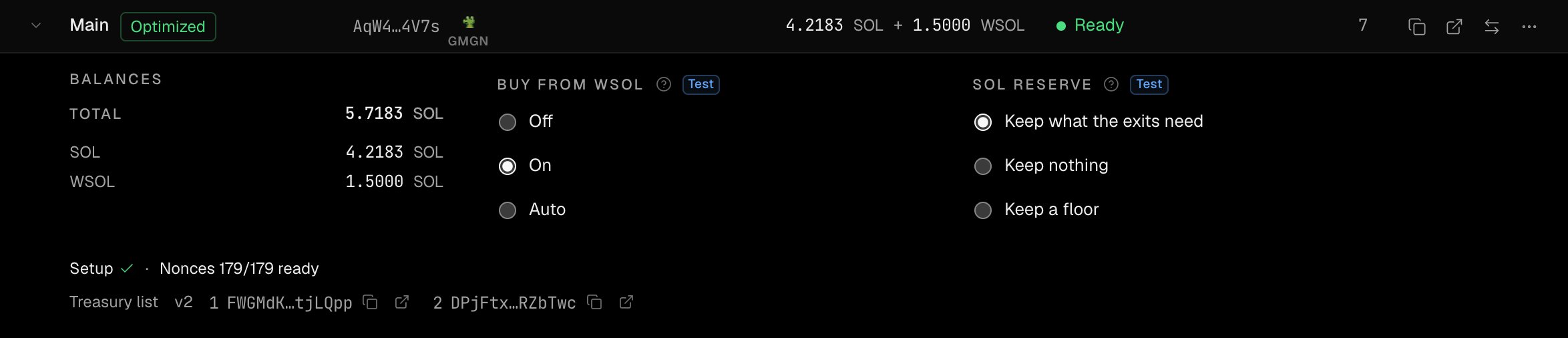
Every wallet has full pools: “128 entry · 50 exit · 1 admin (recommended for any busy wallet)”. You don’t choose their sizes. Its ”?” says: “Every wallet gets full pools. Entry: buys at once. Exit: about five per open position.”- Entry: buys at once. Each buy takes a nonce from the entry pool.
- Exit: about five per open position.
- Admin: one nonce. Wrap, unwrap and withdraw queue on it.
Buy from WSOL
Buy from WSOL
SOL coins’ buys off the Pump curve can pay from WSOL as it is: smaller, cheaper transactions. WSOL must hold what buys spend. Pump curve buys pay in SOL whatever the choice.
A new wallet starts on Auto; you can pick another choice when you add it. A wallet that never chose shows Auto.
In the wallet’s details one click saves the choice; it is live in ~10 s. With On, Unwrap all WSOL in Move funds asks you to confirm first: unwrapping all empties the WSOL, and buys from WSOL stop until the next wrap.
SOL reserve
SOL reserve
What the wallet keeps of its SOL for its open positions. The WSOL it holds counts toward none of them: it pays no fee.
With Keep a floor, enter the floor in SOL; in the wallet’s details it saves with its Save or Enter. A floor of 0 is no floor: choose Keep nothing instead. Under the wallet’s rent exemption (about 0.00065 SOL), it keeps that exemption.
Keep nothing, or a floor below what the open positions’ sells may cost, shows the risk and asks you to confirm before it saves:
- Keep nothing: “Its positions’ sells pay their fees and tips from the same SOL. Once it is spent, a sale fails (its fee paid) or waits until the wallet is topped up.”
- A low floor: the sells of its open positions may cost about a given amount of SOL; below that, a sale may fail or wait until the wallet is topped up.
Treasury list
Space Admin only.
Treasury list
Withdrawals go only to these addresses, signed with the wallet’s key. Without a list the wallet withdraws nothing: “None: this wallet withdraws nothing until a Space Admin signs one (Treasury list… in the ⋯ menu).”- 1 to 8 Solana addresses, one per line, each once. Never the wallet itself, and never a secret key: the panel refuses both.
- Type it when you add the wallet (signed as version 1), or later with Treasury list… in the wallet’s ⋯ menu, then Sign and save.
- Signing a new list needs the wallet’s key, entered again: it signs the list in this browser and is never stored or logged. A generated wallet’s key is shown only once, when it is made: without it you can’t change the treasury list later.
- A new list is signed as the next version and replaces the one before, which stops once the new one is live (~10 s). A list can be replaced but never removed, and every Space Admin of the owner is notified when it changes.
- An archived wallet still withdraws to its list.