

At a glance
“A new job” is what a job starts with when made without a template. Recipes, templates, and global settings may give other values.
Where each row sits in the editor: How a buy goes. In global settings they fall into groups:
- Buy slippage: the buy’s slippage and each copy’s own.
- Hop slippage: the hop slippage.
- Route: the coin’s floor on chain, with the rest of the Route section.
- Sell slippage: the sell slippage and the escalation slippage.
- Way back: the way-back slippage and Sell to.
Buy slippage
The buy’s Slippage on the Buy tab sets the fewest coins the buy must get. If it would get fewer, the buy fails, costing only its network fee.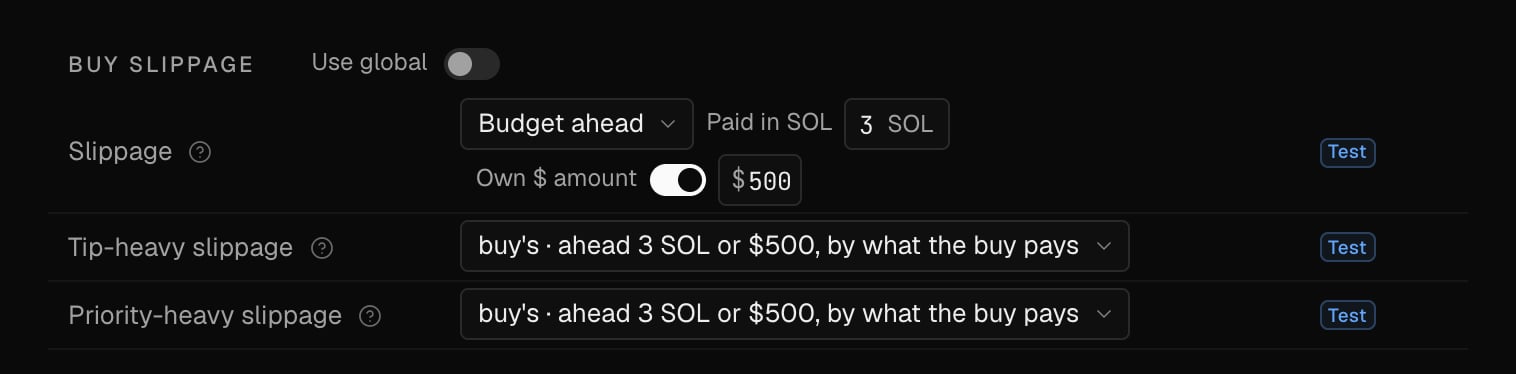
- Percentage: how far under the quote the output may fall, 0 to 100%. Example: the quote is 2,000,000 tokens and the slippage 10%. The buy lands if it gets at least 1,800,000 tokens.
- Budget ahead: how much others may buy before you, the dev’s bundle included; the minimum is counted as if those buys had landed first. It holds two amounts, by what the buy pays: Paid in SOL for a buy paid in SOL (a USD coin bought through SOL too), and a dollar amount for a buy paid in dollars. Example: Budget ahead 3 SOL. If other buys of 3 SOL or less land in the block before yours, yours lands; if more, it fails.
Where the job pays SOL for every coin, or dollars for every coin, the panel marks the amount its buys never take “not used”.
The engine may refuse a buy whose slippage is above its ceiling: Activity shows Above the slippage ceiling.
A copy’s own slippage
Each buy goes out as two copies, tip-heavy and priority-heavy, and only one can land. Each copy may have its own slippage: Tip-heavy slippage and Priority-heavy slippage.- buy’s (the default): the copy takes the buy’s Slippage, shown beside it.
- Percentage or Budget ahead: the copy’s own.
Hop slippage
Routed buys only. Before the coin’s buy, the hops swap SOL (or USDC) into the coin’s quote. Hop slippage sets how far under their quote the hops’ delivery may fall. If the hops deliver less, the buy fails at the hops, costing only its fee.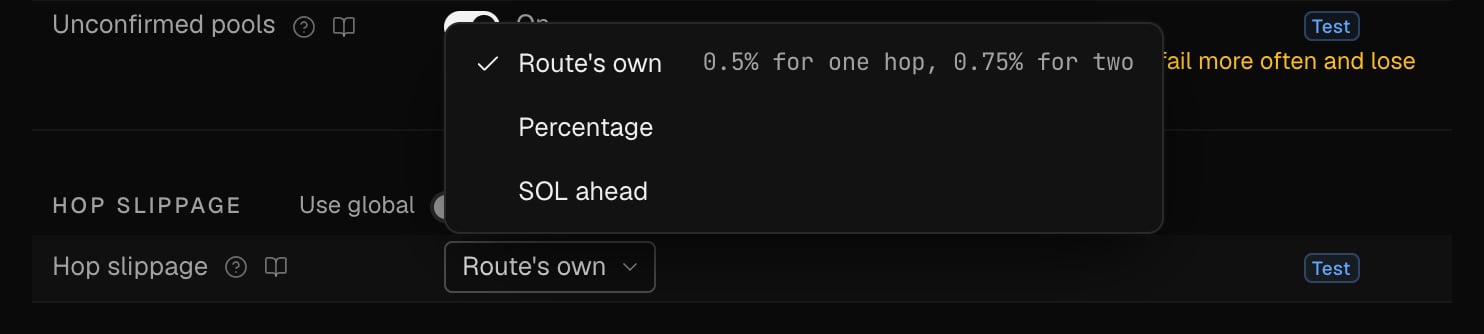
An example. A coin quoted in PUMP, a 1 SOL buy. The router quotes 1 SOL → 50,000 PUMP.
The coin’s own slippage stays its own: it is counted from what the hops are expected to deliver, and a move on the hops does not take it (with Coin’s floor on chain on, below).
Top-ups and copy add-ons never read Hop slippage: they take the route’s own margin.
Coin’s floor on chain
Routed buys only. A row in the Route section. It decides what the coin’s minimum is counted from when the hops did not deliver exactly their quote.- On (the default): the coin’s minimum is checked against what the hops actually delivered, so a hop that delivers a little less no longer fails a good buy. Slippage holds the coin, Hop slippage holds the hops, and the worst you accept is both together.
- Off: a fixed minimum, counted from the hops’ quote. A shortfall on the hops then spends the coin’s slippage, and a hop that delivers a little less may fail the buy.
Worst together = 1 − (1 − hop slippage) × (1 − coin slippage)
Going on with the example above: at 50,000 PUMP the coin quotes 2,000,000 tokens, the coin’s slippage is 10%, the hop slippage 2%. The hops delivered 49,000 PUMP (−2%). With On the coin’s minimum is 1,800,000 × 0.98 = 1,764,000 tokens, 11.8% under the quote, and the coin keeps its whole 10%: the buy fails only if the coin’s price moves more than 10%. With Off the minimum stays at 1,800,000 tokens although 49,000 PUMP buys fewer coins: the buy fails once the coin’s price moves about 8%, because the hops’ shortfall took 2% of the coin’s margin.

- Past 90% hop slippage the coin’s floor on chain is a little tighter than both together (at most 0.15% at 99%), and at 100% it stays fixed.
- A coin with a transfer fee always keeps a fixed minimum.
- A buy whose worst together is above the engine’s slippage ceiling may be refused.
Sell slippage
The Slippage on the Sell tab is how far the price may move against the coin’s sale, 0 to 100%. A new job’s is 10%. A position sells with the slippage it was bought with.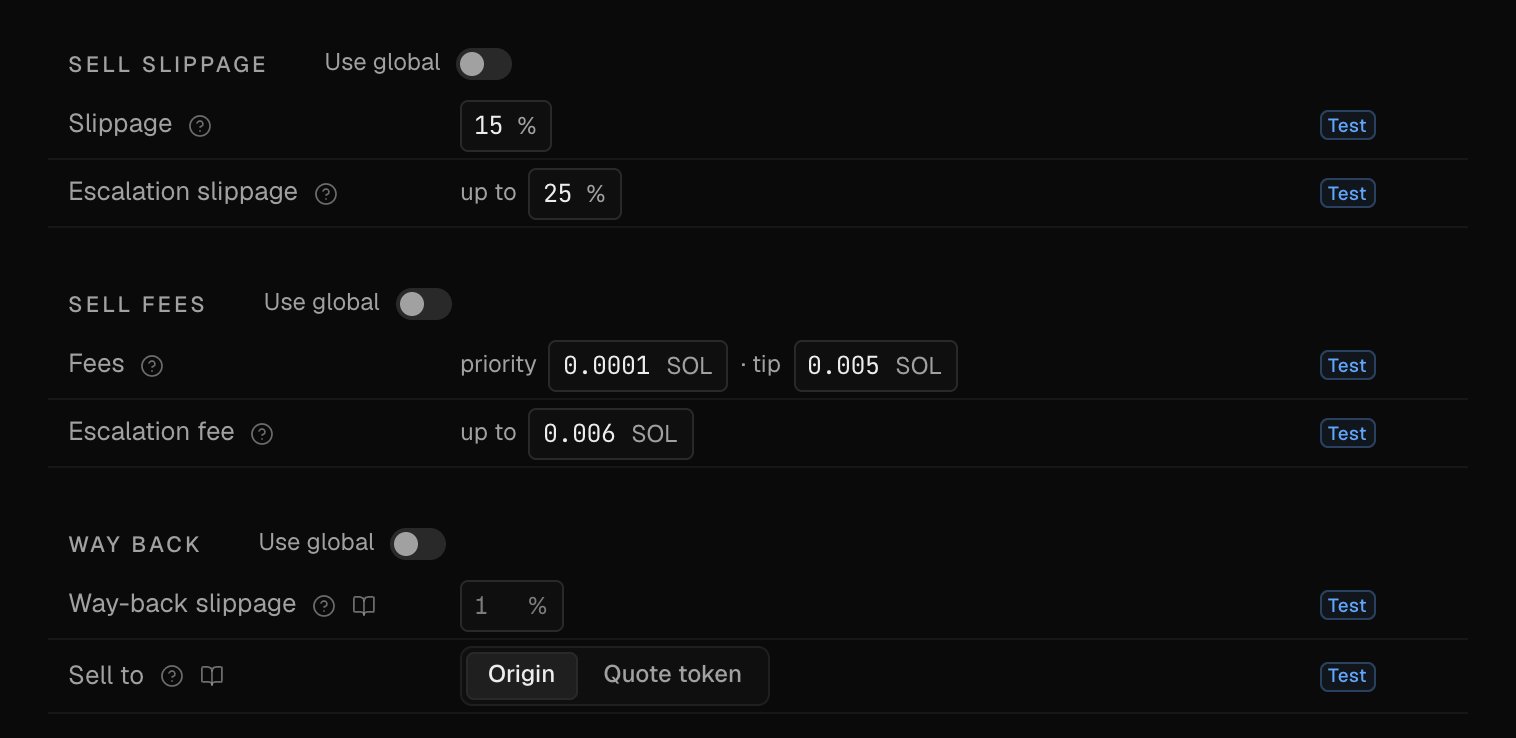
Escalation slippage
A stop-loss, trailing, or liquidity-loss sale that fails on chain is retried, and each retry may widen the slippage, never past Escalation slippage. It is at least the sell Slippage. Other sales never widen it. Example: Slippage 15%, Escalation slippage up to 25%. The stop-loss goes out at 15%; if it fails, retries try wider, up to 25%. With Escalation slippage equal to Slippage, a retry keeps the same slippage: the row says ”· no escalation: the bounds equal the base values”. A new job has both at 10%. A retry widens only the coin’s sale. It never touches Way-back slippage.Way-back slippage
Routed sales only. A coin of a custom quote, or a USD coin bought with SOL, first sells for its quote; then the way-back hops bring that quote back to SOL or USDC, whichever bought the position. Way-back slippage is the slippage on those hops, apart from the coin’s own sale.
Example. The coin sold for 40,000 PUMP, which the router quotes at 0.8 SOL. With 1% way-back slippage the hops must return at least 0.792 SOL; with 3%, at least 0.776 SOL.
A coin quoted in SOL, or a USD coin bought with the dollar amount, has no way back: its sale has no hops.
Sell to
Routed sales of a custom quote’s coin only. Where the sale ends.- Origin (the default): back to what bought the coin: SOL, or USDC for a position bought with USDC. A sale with no route back in one transaction, or one the router holds for about a minute, ends in the quote: it stays in this wallet, valued at the entry’s rate.
- Quote token: the coin sells for its quote alone, with no way back. The quote token stays in this wallet until you move it: no command sells or sweeps it. The position shows how much stayed in the quote.
Next
Route guards
Which routes a buy accepts, and what Buy any route does.
Scenarios and common mistakes
Ready setups, and what passes or gets skipped.