

Settings that LaserCat is still testing on live trading carry a Test badge. Its tooltip says: “We’re still testing this setting on live trading. It works; if anything looks off, tell the LaserCat team.”
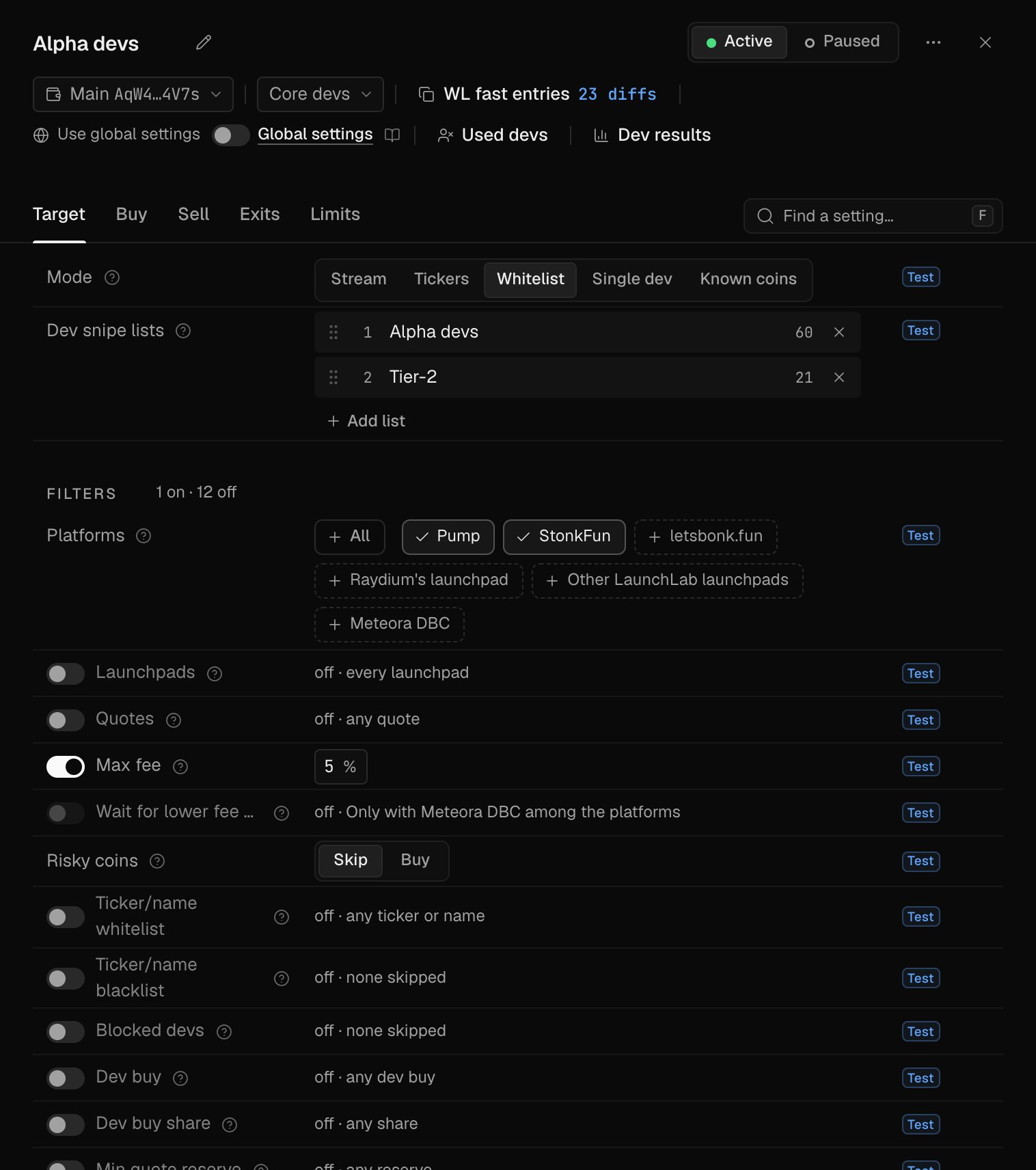
Target
Snipe jobs. A Snipe LP job’s rows are at the end of this page.Mode
Who this job buys: every launch, listed tickers, your dev snipe lists, one dev, or known mints. A job has one mode at a time. A combination made elsewhere is valid and shows as Custom: “Custom target: … Valid as it is; picking a mode replaces it.”
Until a mode has what it watches, its row says what is missing: Add at least one list, Pick at least one ticker list, Paste the dev address, or Add at least one mint. Switching the mode never changes Blocked devs or Exact mints: they filter every mode.
Dev snipe lists
Whitelist mode. Order matters: the first list that holds a dev decides its settings and dev group. A new order can be structural. Add list adds one list. Add all adds every dev snipe list there is now, in this order; a list made later is not added by itself. Drag a list, or press Alt+↑ / Alt+↓, to change the order. A job names at most 64 dev snipe lists.Devs in the job
A Custom target that names 50 devs or more in the job itself shows them as a count: “Devs named in the job itself, matched first, with the job’s settings. At most 1,000.” Move to a new list makes a dev snipe list of them and names it first in the job in their place; save the job after.Dev address
Single dev mode. The one dev this job buys. Paste their address.Coins
Known coins mode. Mints bought as soon as they launch, a vanity address announced before the coin exists among them. Up to 64. Named coins get no dev rules.Filters
Filters narrow every mode. Most filters have their own switch before their label. Off, the row says what passes, for example “off · any fee”. The section’s header counts them, for example “3 on · 12 off”. Platforms, Risky coins, and Pump’s filters are plain choices with no switch.Platforms
Launchpads this job watches. Pick at least one; All ticks every platform. By default: Pump and StonkFun.
Removing a platform also removes its Dev field. Adding Meteora DBC or letsbonk.fun takes it out of Launched elsewhere (Limits tab). Removing Meteora DBC clears Wait for lower fee. The panel tells you when it makes such a change.
Launchpads
Buys only the launches of these launchpads, or skips them.- Only these: launchpads to buy. Empty: Any, every launchpad.
- Skip these: launchpads never bought. Empty: None. Skip beats buy.
Quotes
The currency a launch’s pool is paired with. Platforms and launchpads pick where a launch comes from, this filter what it is paired with: a launch must pass all three. USD coins (USDC, USDT, USD1) use the dollar amount, unless USD funding buys them Through SOL; other quotes are bought with SOL through the router, or as Custom funding on the Buy tab says. Skip beats buy.- Quotes to buy: SOL (SOL coins are quoted in WSOL), USDC, USDT, USD1, or a custom quote mint you paste (marked routed). The picker reads Only and the quotes; empty: Any quote.
- Quotes to skip: the same choices. The picker reads Skip and the quotes; empty: Skip none.
Max fee
Skips a coin whose trade fee is above this: from 0.01% to 99%, 5% by default and when you turn it on. For a coin bought through a route, the cap covers the whole route: the fees of every pool on the way and the coin’s own. Off: any fee, no cap. A Meteora DBC fee scheduler can charge 10–99% at launch.Wait for lower fee
Right under Max fee, tagged Meteora DBC (“Only for Meteora DBC launches”). A Meteora DBC coin over the fee cap is bought if its fee drops under it within this time. The row reads “until the fee falls to” the max fee (= max fee: changing it here changes the max fee) and “wait at most”: from 1 s to 10 min, 30 s when you turn it on. It needs a Max fee and Meteora DBC among the platforms; without them the switch stays off and says why. Off: no wait.Risky coins
Coins whose mint lets someone else act on your tokens: a Token-2022 transfer hook that names a program, or a freeze authority the mint keeps. A plain choice:- Skip (the default): never bought, freezable coins included.
- Buy: bought too, a hooked coin with the accounts its hook asks for. A warning sits beside it: “No honeypot check: the coin’s transfer hook may refuse our sale, and its freeze authority may freeze the position. At your own risk.”
Ticker/name whitelist
Buys only coins whose ticker or name matches these ticker lists. The ticker is the coin’s symbol, the name its full name. Each list’s Match field (Lists page) says what it compares: Name, Ticker, or Both, which is either of them. Lists of the same field are alternatives, one match is enough; with lists of different fields, a coin must match each field. Pick up to 8 ticker lists. Off: any ticker or name. In the Tickers mode it is what the job buys, and its switch stays on: “A Tickers job buys the coins this whitelist lets in: pick another mode to go without it”. In another mode it narrows that mode’s coins. The Ticker/name blacklist still skips a coin it matches. In a template, a new job made in the Tickers mode starts with these lists; other modes start without them. Apply keeps each job’s own.Ticker/name blacklist
Skips coins whose ticker or name matches one of these ticker lists, in every mode, even one the Ticker/name whitelist lets in. Each list’s Match field says what it compares. Pick up to 8 ticker lists. Off: none skipped. In a template, new jobs start with these lists, and Apply keeps each job’s own.Blocked devs
Creates by devs on these blocklists are skipped, in every mode, even a dev or coin the job names. Any identity of the create counts (its payer, creator or co-signer), signed or not. Pick up to 8 dev blocklists. Off: none skipped. Block in this job on a job’s dev results adds a list of its own here: see A job’s devs. In a template, new jobs start with these lists, and Apply keeps each job’s own.Dev buy
The dev’s own buy in the create, fees excluded. Other wallets’ bundled buys never count. Set min and max in SOL, and a second range for USD coins in $. An empty bound is none. Off: any dev buy. While the job may buy coins of other quotes, the row shows other quotes: routed. Its tooltip: a coin quoted in anything but SOL, USDC, USDT or USD1 (a tokenized stock, say) is held to this range at the buy, its dev’s buy valued in SOL through the router. Out of range or not valued, the buy is vetoed, and the wallet’s other jobs skip the coin. With no SOL bound, the USD range holds it, valued in dollars.Dev buy share
How much of the coin’s supply the dev’s own buy in the create took from the curve, on coins of every quote and platform. Set min and max in % of supply. Off: any share.Min quote reserve
The curve’s quote reserve at the trigger must be at least this much: SOL for SOL coins, $ for USD coins. Off: any reserve.Exact mints
Mint addresses checked after the target picks a coin, in every mode.- Only these: with an allow list, only its coins are bought. Empty: any coin.
- Skip these: skips its coins, and beats the allow list.
Mint prefix/suffix
Prefixes and suffixes of the mint, case-sensitive, no wildcards. Any include may match; any exclude skips. Four lists: Starts with · include, Starts with · exclude, Ends with · include, Ends with · exclude. Each takes up to 8 entries of base58 characters only (1–44), for examplepump. Off: any address.
Deploy transaction
The create transaction’s message version and compute budget: the launching tool’s fingerprint. Not set is not zero.- Versions: Legacy, V0, V1, its message version. Keep at least one; all three read Any.
- CU Limit: the compute units the transaction asks for, not the ones it used.
- CU Price, µlamports: its priority price per compute unit, in micro-lamports.
- Account Data: the most account data it may load, in bytes.
Pump
Pump’s own filters sit under its name at the end of the filters. If the job does not trade Pump, the group says “not traded by this job” and folds away behind Show. A Pump filter that is on stays in view, marked “its filters have no effect”. Each is a plain choice, its answer at sight.Mayhem
Mayhem-mode tokens: skip them, buy them, or buy only them. Choose Skip, Buy (bought like any token), or Only (every other token is skipped).Cashback coins
Pump cashback coins: skip them, buy them, or buy only them. Choose Skip, Buy (bought like any coin), or Only (every other coin is skipped). Pump has refused new ones since 2026-09-12, so this matters only if it allows them again.Create variants
Pump’s creates the job buys: a Token coin, a Token-2022 coin, or both. Tick Token coins (create), Token-2022 coins (create_v2), or both (the default); at least one.Fee sharing
Any coin (the default), or Only with fee sharing: only coins whose create set up creator fee sharing, with its admin revoked or not, and the number of shareholders.- Admin: either, Admin revoked, or Admin kept.
- holders: min and max, from 1 to 10.
Dev identity
Dev field
Which identity of a create is the dev, per platform. Structural: the dev keys and per-dev caps follow it. The row shows one picker for each platform the job trades, under its family’s name: Pump; LaunchLab (StonkFun, letsbonk.fun, Raydium’s launchpad, Other LaunchLab launchpads); Meteora DBC. Each picker shows The deployer until you choose another.Unsigned creators
Shows in the Whitelist and Single dev modes, and in a custom target that names devs. It matters only where a platform’s dev field is The creator or Any of the three.- Off: a creator counts only if they signed.
- On (Count as signed): a create that names a listed dev as its creator is the dev’s even unsigned, an impostor’s too. Use it only for a launchpad that launches for people who do not sign.