

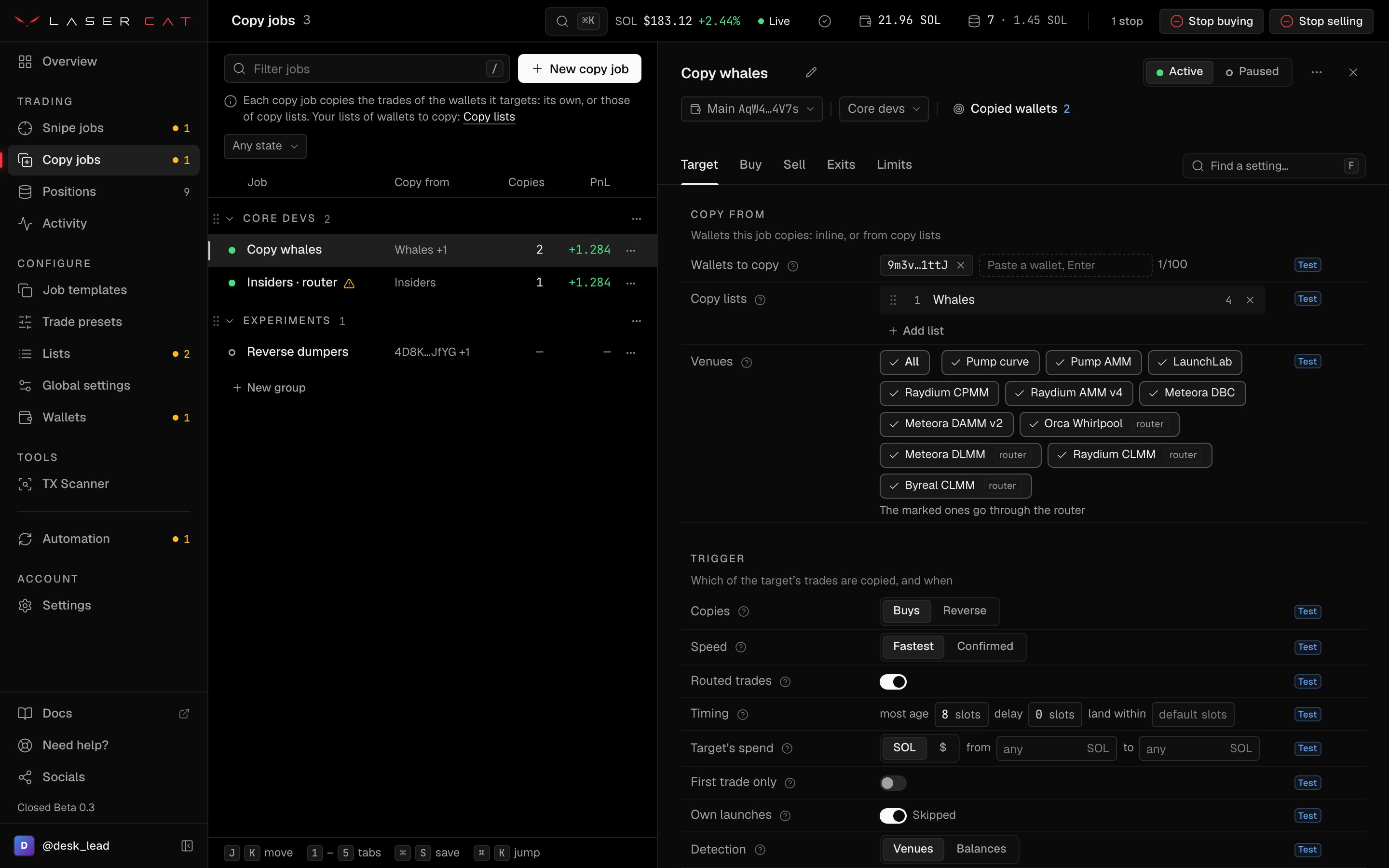
The Copy jobs page
The table shows each copy job’s Status, Copy from (its own wallets and its lists), Wallet, Sizing, Exits, Mirror, its Open positions, the Copies bought in its limit window, and PnL. Click a row to open the job; the switch pauses or activates it. In the LaserCat layout the list shows Copy from, Wallet, Copies and PnL beside each job: see Interface settings. A job past its expiry reads Halted: expired. Move its expiry later or clear it in Limits, then resume it.Create a copy job
Trader or Space Admin.
1
Open New copy job
On Copy jobs, press New copy job (N).
2
Name it and pick a wallet
The panel’s advice: “A wallet of its own is best: its copies share the wallet with your snipes.” The picker says how
many jobs already use each wallet.
3
Add targets
Paste wallets, one a line or by commas, up to 100 (put the rest in a copy list), or pick a copy list. A wallet that
trades with LaserCat can’t be a target: it is left out, and the dialog says so.
4
Set the amount and create
Amount per copy: each copy buys this much. Change the sizing in the editor later. The job is created paused.
The editor
A copy job’s editor has the same five tabs as a snipe job, with rows of its own. Its rows for coins of other quotes (hop slippage, the route, the way back) work as a snipe job’s: see How a buy goes.Target
The tab has three parts: Copy from (whom the job copies), Trigger (which of their trades, and when) and Filters (which coins).
Target’s spend, Market cap and Liquidity each take one limit, in SOL (the default) or in dollars, nothing
converted. A dollar limit on a SOL coin, and any limit on a coin of another quote, is checked at the router’s rate:
while the router does not serve, such a coin is not copied.
Buy
Sizing decides how much each copy buys, by the target’s trade:- Least and most: each copy buys at most the most; a copy under the least is skipped. SOL coins in SOL, USD coins in dollars.
- Market-cap tiers: up to 8, each with its own sizing, slippage and fees, by the coin’s market cap at the target’s trade. The first tier that holds the coin wins; with tiers, a coin no tier holds is not copied.
- Buys per coin: the position’s buys in all, its first copy included. 1 copies the target’s first buy alone; more buy again when the target buys more of the coin (add-ons). Up to 64.
- Price guard: skips a copy that would pay more than the target’s price plus this. Empty: off.
Sell
Mirror sells decides how the job follows the target’s sells; the job’s exits fire beside them.
Below them come the sell’s usual rows, with Way-back slippage and Sell to for coins of other quotes: see
Slippage.
With Auto-sell off, exits never fire; positions still sell by mirror sales or by your commands.
Exits and Limits
Exits are a job’s usual exits: see Exits. Limits add rows of a copy job’s own:- Expires: the job halts at this time; exits and mirror sales keep running. A new limit window does not lift it: to resume an expired job, move its expiry later or clear it first. Empty: never.
- Coin cooldown: a coin whose copy closed within this time is not copied again.
- Target rules: what happens to a target in this job. Buys per target, Spend per target and Loss per target remove it; Losing streak and Fast dump ban it for a while; Restore after profit starts its count again after a copy that closes with at least this return, and brings back one removed for its buys. Each target keeps its own counts.
Copied wallets and their state
Press Copied wallets on the job to see each target: its label and address (a group by its name), where it comes from (This job or its list), its state, what it spent and realized, and its losing streak.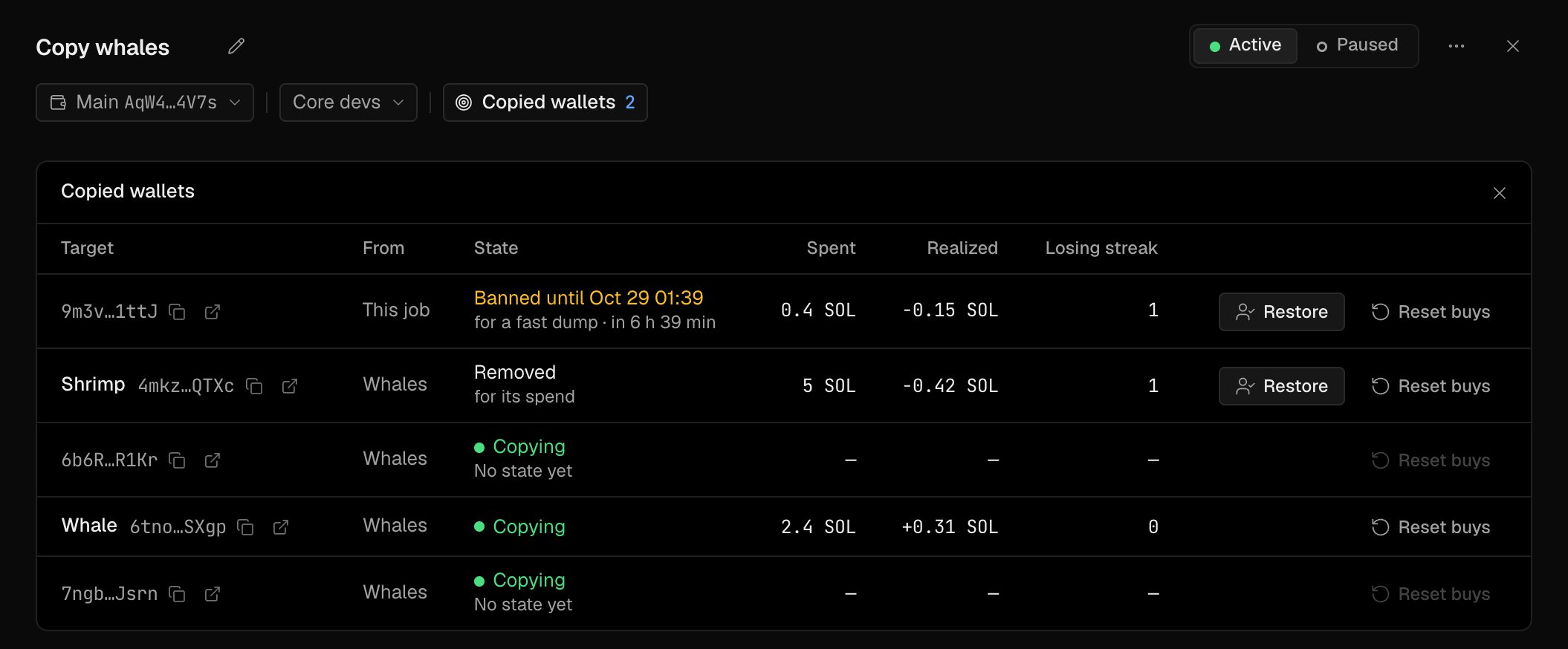
Restore and reset: Trader or Space Admin.
Copies in Activity and Positions
- In Activity, a copy’s line carries a Copy chip and says what the target did, for example “Whale bought 2.4 SOL · Pump · landed 2 slots behind the target”. The Trades filter shows All, Snipes or Copies. A copy job’s skips read Why it didn’t copy.
- When a target buys more of a coin the job holds, the copy’s line says add-on. An add-on that was not bought says why: Add-on: position not open, Add-on: two waiting (they go one at a time), Add-on too late, Add-on cancelled (a sale or the close of the position cancelled it), or Add-on limit (the position has all the buys Buys per coin allows).
- A buy copied by Balances shows what the target spent as “at most …”: it is read from the target’s balances, its bot’s fee included. A Venues job that skipped such a buy says a job with Detection set to Balances copies it.
- In Positions, a copy position carries a Copy chip with the target’s label. Its Copy block shows the Target, the share the target has sold since the copy (Target sold), the Add-ons that landed, and how far Behind the target the copy landed. Its steps add Mirror sale (a sale that followed the target) and Add-on.
- An add-on that fails on chain gets its own Telegram notice: see Notifications.
Next
Copy lists
Keep the wallets you copy in lists, each with its own amount and preset.
How a buy goes
Hop slippage, the route and the way back for coins of other quotes.