

Where balances show
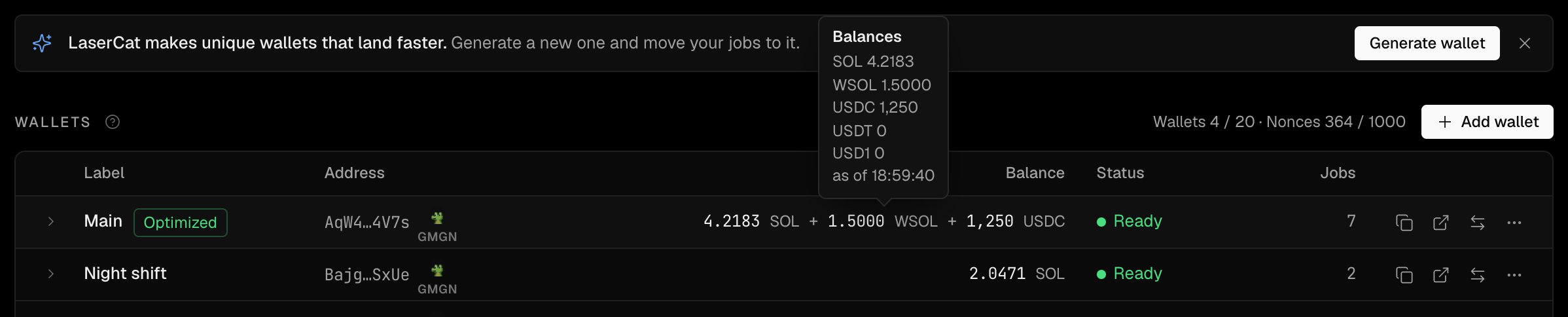
- Wallets page. The Balance column shows the wallet’s SOL, then the WSOL and each stablecoin it holds. Hover it for Balances: SOL, WSOL, USDC, USDT and USD1, and the time they were read, such as “as of 14:05:09”.
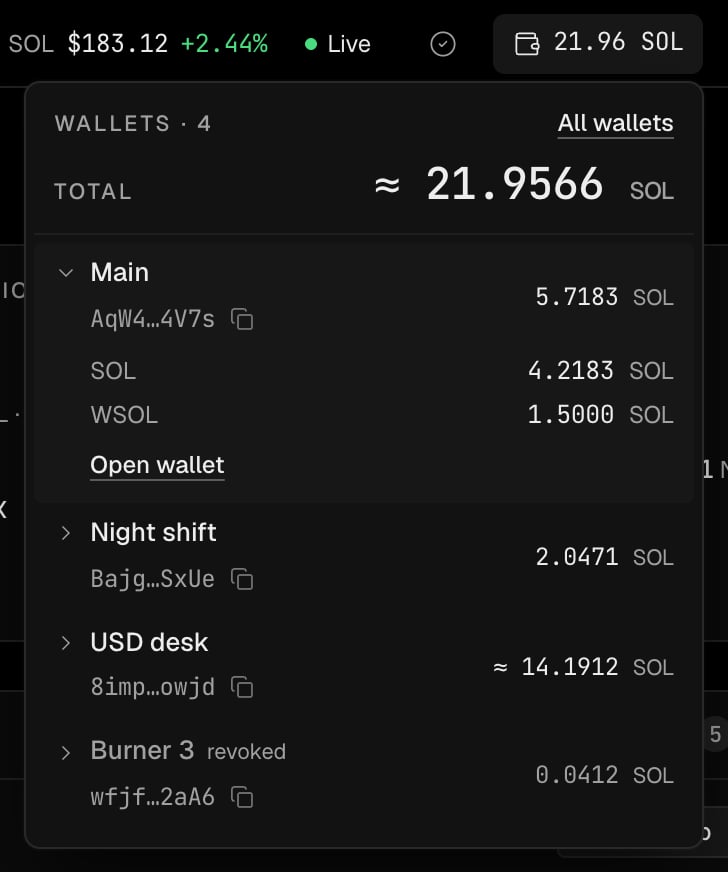
- A wallet’s details. Open a wallet’s row to see Balances: the Total in SOL, then SOL, WSOL and each stablecoin with its value in SOL. Hover Total: “SOL and WSOL, and stablecoins at the SOL price in the top bar.” Beside the balances are Buy from WSOL and SOL reserve; a change saves at once. Edit… shows the same.
- Top bar. The wallets chip shows what your active wallets hold, in SOL: their SOL, WSOL and stablecoins together. With one active wallet, it shows its label too. Its tooltip reads “What 3 active wallets hold, in SOL: SOL, WSOL and stablecoins.”
What each balance is
When the wallet’s buys were held for lack of SOL while it holds WSOL, the Wallets page says “Buys from Night 2 were held in the last hour: short of SOL.” The WSOL “pays no fee and counts toward no reserve”, so the page offers Unwrap WSOL…. See Treasury list and funds.
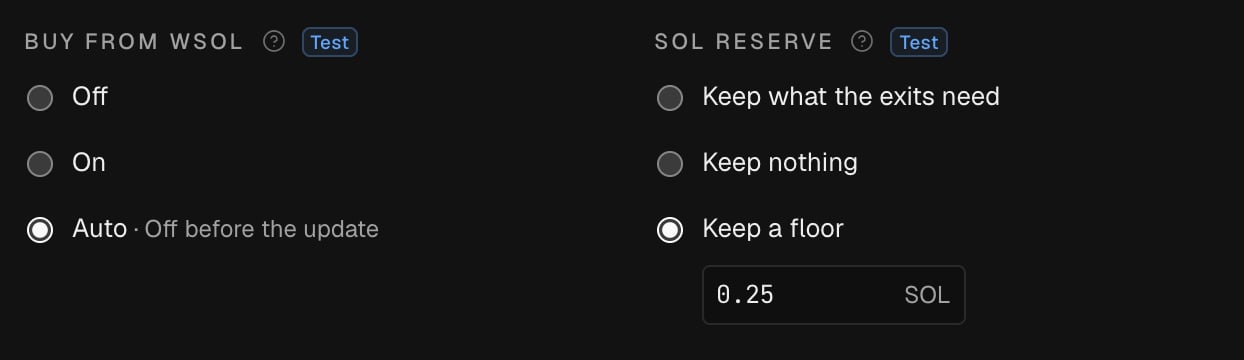
Buy from WSOL
Traders and Space Admins change it. A Viewer sees “Viewers can’t change wallets.”
“Pump curve buys pay in SOL whatever the choice.”
A new wallet starts on Auto, and a wallet that never chose shows Auto.
Change the choice in the wallet’s details, where one click saves it, or in Edit… in its ⋯ menu. It applies in about 10 s. With On, unwrapping all of the wallet’s WSOL asks you to confirm first. See Treasury list and funds.

SOL reserve
Traders and Space Admins change it. A Viewer sees “Viewers can’t change wallets.”
“The WSOL it holds counts toward none of them: it pays no fee.”
Keep nothing carries a risk: “its positions’ sells pay their fees and tips from the same SOL. Once it is spent, a sale fails (its fee paid) or waits until the wallet is topped up.” A floor below what the open positions’ sells may cost carries the same risk; the panel estimates “0.0072 SOL a position at the template’s fees”. A floor of 0 is refused: choose Keep nothing instead. Under the wallet’s rent exemption, about 0.00065 SOL, the wallet keeps that exemption.
Saving Keep nothing or a low floor asks you to confirm: “Every held sell goes again by itself once the wallet’s SOL rises.” In the wallet’s details, a choice saves on the click, and a floor saves with its Save or Enter. Set the reserve when you add the wallet, in the details, or in Edit…. It applies in about 10 s.
The reserve also holds back Move funds: a withdrawal or a wrap never takes the SOL the reserve keeps. See Treasury list and funds.
Every wallet setting is listed in Wallet settings.
Balance unavailable
When LaserCat can’t read balances, the top bar’s wallets chip says Balance unavailable: “LaserCat can’t read balances right now.” The Wallets page shows “unavailable” in the Balance column, and Balance unavailable in a wallet’s details and on a phone. It never shows an amount then. Move funds shows no held amounts and no Max until balances come back.Next
Treasury list and funds
Wrap, unwrap, and withdraw.
Wallet settings
Every wallet setting in one place.