

The treasury list
Space Admin only, in the panel.
- A treasury list holds 1 to 8 addresses. “Withdrawals go only to these addresses, signed with the wallet’s key.”
- A Space Admin signs it in the panel with the wallet’s key. The key is entered again for each change, and it is never stored.
- A wallet without a list withdraws nothing. Its details show Treasury list None, and the tooltip says “None: this wallet withdraws nothing until a Space Admin signs one (Treasury list… in the ⋯ menu).”
- A newer signed list replaces the old one, but a list is never removed. Every Space Admin of the owner is notified when it changes.
- An archived wallet still withdraws to its list, and its list can still be changed.
Sign or change the list
1
Open the dialog
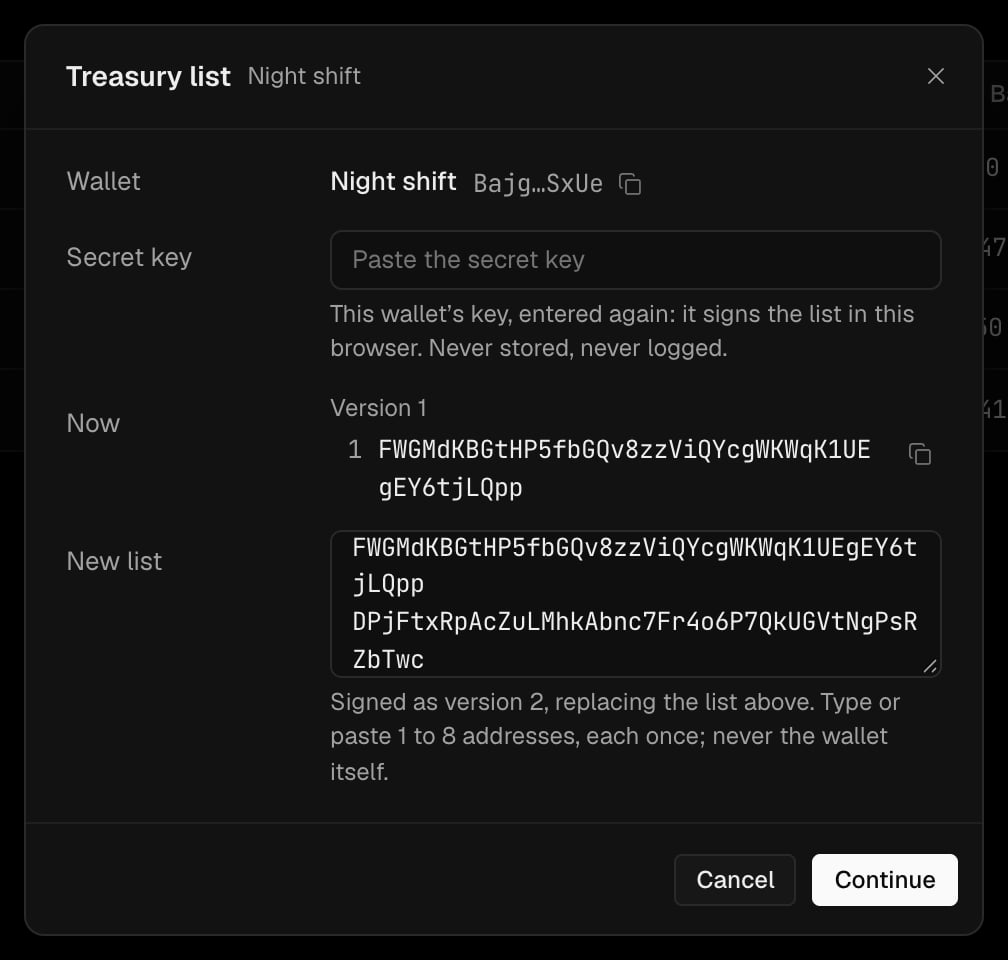
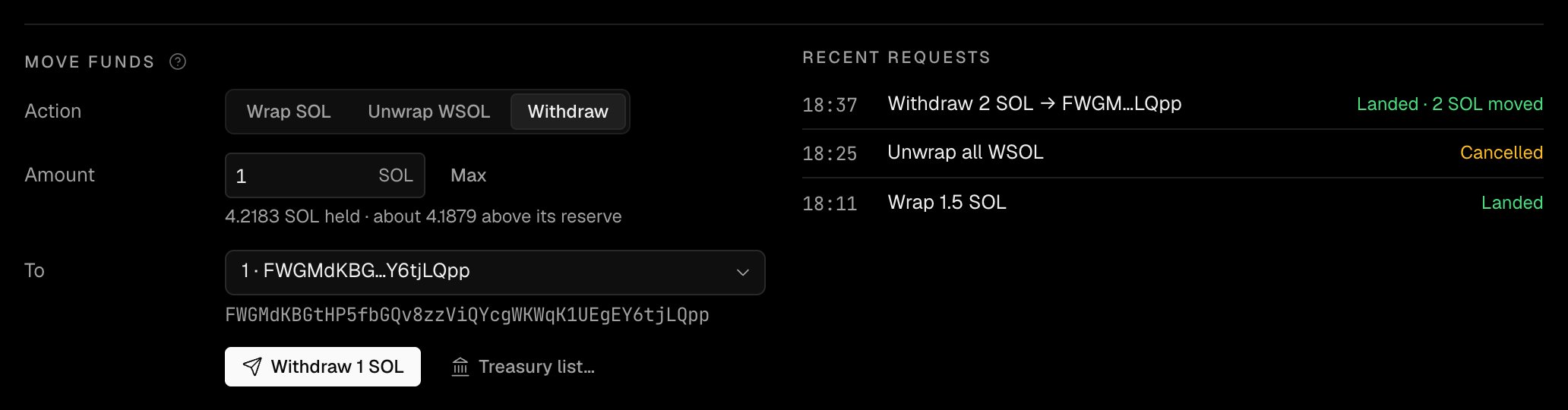
On the wallet’s row, open ⋯ and choose Treasury list…. With Withdraw picked in Move funds, the Treasury list… button beside the send button opens it too. You can also sign the first version when you add the wallet.
2
Enter the wallet's key
Paste the wallet’s Secret key: “This wallet’s key, entered again: it signs the list in this browser. Never stored, never logged.”
3
Type the new list
Now shows the list in force. Under New list, type or paste 1 to 8 addresses, one per line. Each address goes in once, and never the wallet itself.
4
Check and sign
Press Continue, check every address and its order, then press Sign and save. The new version replaces the old one once it is live, in about 10 s.
Move funds
Space Admin only, in the panel. Everyone else sees “Only Space Admins move funds.”
The button says what it will do, such as Wrap 1 SOL, Unwrap all WSOL or Withdraw 2.5 SOL. A withdrawal asks you to confirm and names the address and its place on the list: “address 1 of its treasury list (version 2). Lands in ~10 s; every Space Admin gets a Telegram notice.”
A withdrawal or a wrap never takes the SOL the wallet’s SOL reserve keeps. For more than that, the form warns: “More than the wallet holds above its SOL reserve (about 1.2 SOL): the engine holds the request, nothing moves, and it ends cancelled.”
When Buy from WSOL is On, Unwrap all WSOL asks you to confirm first (“Unwrap all WSOL of Night 2?”): unwrapping all empties the WSOL, and buys from WSOL stop until the next wrap.
These actions queue on the wallet and land in about 10 s. Every Space Admin gets a Telegram notice. Recent requests, beside the form, lists the wallet’s latest requests and how each ended; a refused one says why.
Limits
- At most 16 wraps, unwraps and withdrawals per wallet in any rolling hour.
- A daily withdrawal cap per wallet may apply.
- A withdrawal or a wrap takes only what the wallet holds above its SOL reserve.
- A treasury list holds 1 to 8 addresses.
- A wallet withdraws only to its treasury list. Without one, it withdraws nothing.
Next
Balances
SOL, WSOL, Buy from WSOL, and the SOL reserve.
Telegram notifications
The notices Space Admins get.