

Open it
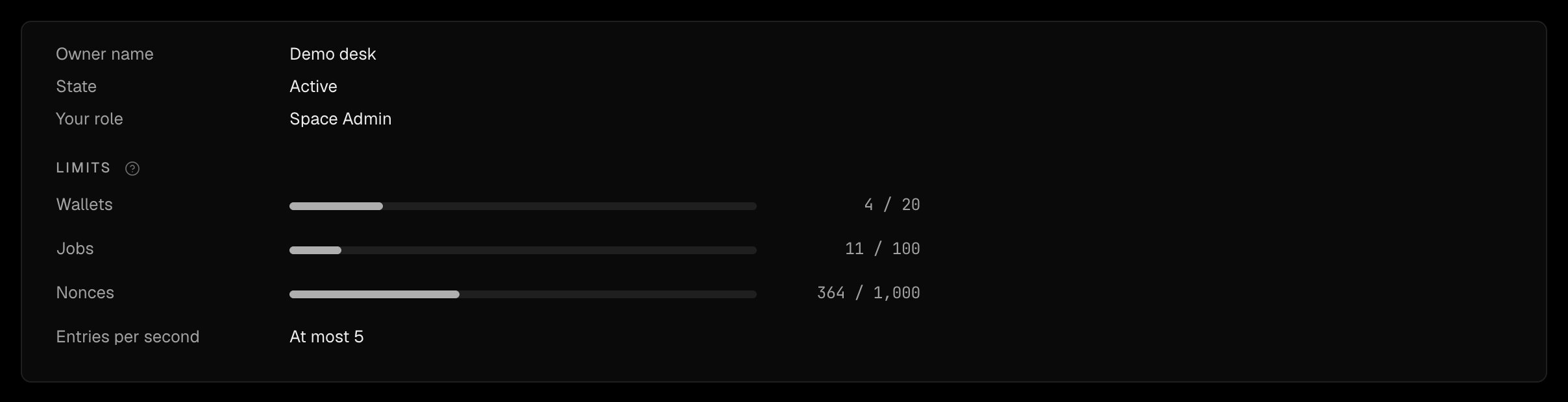
Click Settings in the sidebar, or in the menu under your name at the bottom of the sidebar. Owner is the first tab.What it shows
Limits
LaserCat sets your owner’s limits. The panel warns before you reach one, and nothing past a limit is accepted. To change them, write to the LaserCat team. Each row shows what is in use and the limit:- Wallets: wallets that are not archived.
- Jobs: jobs that are not archived.
- Nonces: the entry, exit, and admin nonce pools of every wallet not archived, plus the admin nonce each archived wallet keeps. Every wallet gets full pools, 179 nonces: 128 entry, 50 exit, and 1 admin. A new owner’s limit is 1,000, room for five such wallets.
- Entries per second: the limit only. An entry here is a buy: the buys the owner’s jobs may start in a second, all wallets together. A buy past it is skipped.
Leave this owner…
When you belong to several owners, the tab ends with Leave this owner…. Any member can leave, whatever the role. Click it, then confirm with Leave. You lose access to the owner’s wallets, jobs, and positions; nothing is deleted, they stay in the owner. A Space Admin can leave only while another Space Admin remains; otherwise the panel says it could not leave, and nothing changes. To come back, write to the LaserCat team. With a single owner, the tab has no Leave this owner….Switch between owners
When you belong to several owners, the top of the sidebar is the Owner switcher. Click the owner’s name and pick another; an archived owner is marked · archived. The menu also shows your username, your role in the owner selected, and Settings. On a phone, open More: the owners are in its Owner section.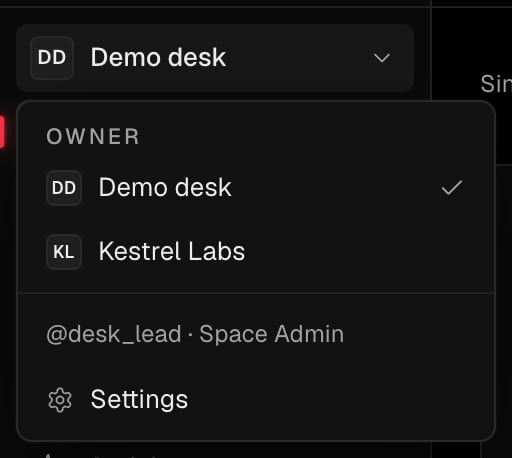
Next
Roles
What each role can do.
Interface settings
Language, theme, and trade notifications.