

Trader or Space Admin to stop and resume. A Viewer sees the stops with the buttons disabled: Viewers cannot
stop or resume trading.
Stop
Every page has Stop buying and Stop selling in the top bar.1
Open the menu
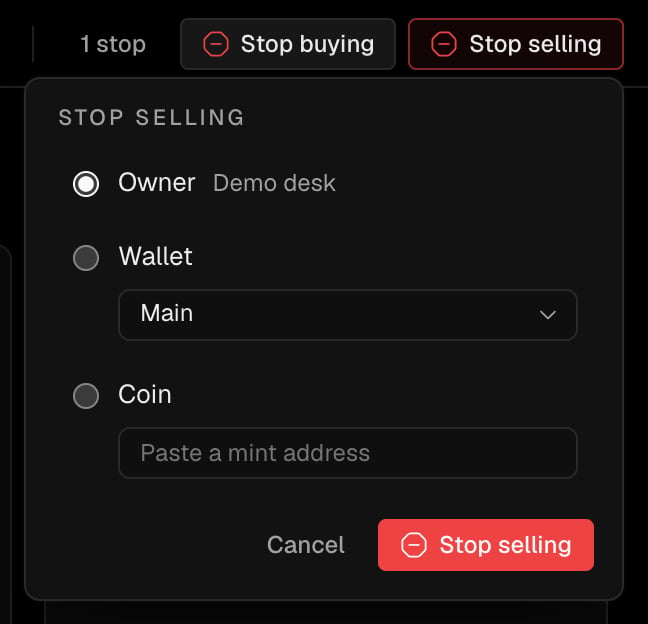
Press Stop buying (new buys of the owner or one wallet) or Stop selling (every exit of the owner, one
wallet or one coin).
2
Pick the scope
Owner, Wallet (pick one) or, for selling only, Coin (paste its mint). For buying, Coin reads
not for buying: to skip a coin, block it in a job’s filters.
3
Stop
Press Stop buying or Stop selling in the menu. It applies at once.
- Stop buying: stops new buys at once. Exits keep running.
- Stop selling: holds every exit at once. Stop-losses won’t fire while selling is stopped.
Stops in force
When the whole owner is stopped, the button turns into a red Buying stopped or Selling stopped chip with Resume. Stops on wallets or coins show in the top bar as a count, such as 2 stops: press it for Stops in force, every stop with its scope and its Resume. A Stops link elsewhere, such as on a problem line in Activity or a position’s warning, opens the same list over the page you are on. On a narrow screen the stops fold into one mark in the top bar that opens the list. In the Telegram bot, a position card’s 🛑 STOP stops selling its coin and ▶️ Resume resumes it, as Stop selling this coin does. LaserCat in Telegram shows the stops in force on its Overview: they are stopped and resumed in the panel.Resume
A resume asks you to confirm first. It applies in about 10 s.- Resume buying: new buys in this scope can start again in about 10 s. Jobs that are paused, halted, at a limit, or outside their hours stay as they are.
- Resume selling: selling resumes in about 10 s. Positions in this scope may sell at once, as soon as their exits fire.
What each stop does
Every stop and resume is a command: it shows in Activity under My actions, with what
became of it. Wrap, unwrap and withdraw are in each wallet’s Move funds.
Next
Selling and closing
Sell or close one position, or many.
Job states
Active and Paused: a job’s own switch.
Activity
Your stops and resumes, and what came of them.